
Your manager has created an account for you. The first step is logging on.
How to Log In to RecStaff
Open any browser and go to https://app.recstaff.com.
You can also go to recstaff.com and click Sign In in the upper-right corner.
Your organization will use one of two login methods:
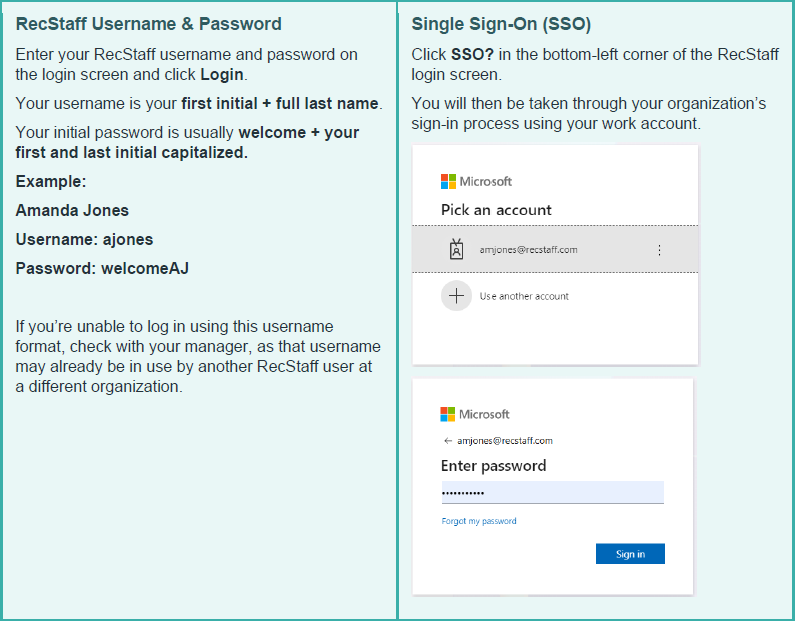
Make RecStaff Easy to Access
For easier access, bookmark the RecStaff login page on your computer and add RecStaff to your phone’s home screen.
Learn how to add RecStaff to your phone

Change Your Password
If you log in using a RecStaff username and password, change your temporary password to something secure that you will remember. You can change your password from your User Profile. Watch how to change your password.
If your organization uses Single Sign-On, your password is managed entirely by your organization (such as your city, employer, or institution). Because your security is handled on their end, our support team cannot reset this password for you. Please update it through your organization’s standard IT portal.
Using RecStaff on Your Phone
We have several videos on our YouTube channel that show you how to use RecStaff.
Search YouTube for RecStaff channel to see the full list.
Getting Started on Mobile
If you regularly use RecStaff from your phone, we recommend:
• Cell Phone Tutorial Part 1 – watch on a desktop
• Cell Phone Tutorial Part 1 – watch on a cell phone
Posting and Picking Up Shifts
When you are ready to learn about posting and picking up shifts:
• Cell Phone Tutorial Part 2 – watch on a desktop
• Cell Phone Tutorial Part 2 – watch on a cell phone
What You May Need to Do in RecStaff
Depending on how your organization uses RecStaff, you may also be asked to:
• Enter your availability so schedulers know when you are available to work.
• Submit time-off requests for vacation or other planned absences.
• Post shifts you are unable to work to the Shift Board.
• Pick up shifts posted by other employees or your manager to the Shift board.
Your manager will let you know which of these features your organization uses.